

Managing money used to feel like a never-ending battle. I’d stare at messy spreadsheets and somehow still miss bills. For months, I hunted for free tools that could actually help me get my finances together—without adding another expense to my plate.
After trying out a bunch of financial apps this past year, I finally found 15 that really changed how I track spending, save, and plan for the future. These apps helped me slash my monthly expenses by 20%, build my first emergency fund, and get a clear picture of where my money was actually going.

The best part? Every app on this list is totally free. I’ll break down how each one improved my money management and which features made the biggest difference for me.
Key Takeaways
- Free financial apps can really boost your money management with automated tracking and tailored insights.
- The most useful apps blend budgeting, spending analysis, and goal-setting features.
- Success depends on picking apps that match your needs and actually using them as part of your overall money system.
How Free Financial Apps Transform Money Management
Free financial apps put powerful budgeting tools and spending reports right in your pocket. They track your finances and help you reach your goals, all without a monthly fee.
Benefits of Using Free Apps for Budgeting
Free budgeting apps make managing money way less intimidating. For me, removing the cost barrier made it easier to get started.
Real-time expense tracking totally changed how I viewed my spending. These apps connect to your bank accounts and show exactly where your cash goes. That instant feedback? Eye-opening.
Most free budgeting apps come with:
- Automatic transaction sorting
- Monthly spending summaries
- Bill reminders
- Simple goal-setting
- Account balance tracking
The best budgeting apps actually learn from your habits. Over time, they get better at sorting your expenses. That’s saved me hours every month.
A lot of these apps also toss in budgeting tips tailored to your real spending, not just generic one-size-fits-all advice.
Real Success Stories: Improved Finances Through Technology
I cut my food spending by 30% after a spending report showed just how much I was dropping on takeout—$400 a month, yikes.
One friend saved $2,400 in six months just by using bill reminders. Late fees and overdraft charges? Gone. Those notifications really do keep you on track.
Someone else I know built an $800 emergency fund in a year by letting an app round up every purchase and save the change. They barely noticed the money leaving their account.
A family of four used category limits to cut $350 from their monthly expenses. Seeing those progress bars fill up kept them motivated.
College students say free apps made it easier to manage tight budgets and avoid debt. Some even graduated with better money habits than their parents.
Understanding the Limitations of Free Financial Apps
Free apps usually make money by showing you ads for credit cards and savings accounts. Sometimes, it feels like they’re pushing products you don’t need.
Limited features come with the territory. Free versions often cap the number of accounts or goals you can set, and some only keep your transaction history for a few months.

Security is always a concern. Not every free app has top-notch protection, so double-check what safeguards they use.
Customer support can be hit-or-miss. With free apps, you might wait days for help. Paid options usually respond faster.
Some free apps delete your data if you go inactive for a while. That can wipe out your financial goals and history.
Advanced stuff like investment tracking or tax planning usually costs extra. Free versions stick to the basics—spending and saving.
Top 15 Free Financial Apps for Better Budgeting
Here are four budgeting apps that totally changed the way I handle money. Each one takes a different approach, from zero-based budgeting to envelope systems.
YNAB: Zero-Based Budgeting Power
YNAB flipped my whole budgeting game with its zero-based approach. I started giving every dollar a job before I spent it.
The app teaches you to assign every dollar a purpose. Income minus expenses and savings? That needs to hit zero. This method finally broke my overspending habits.
Key YNAB Features:
- Tracks expenses in real time
- Sets savings goals
- Plans credit card payments
- Syncs across devices
Learning the ropes took me about two weeks. YNAB’s free workshops and tutorials helped a ton.
When surprise expenses pop up, I just move money between budget categories. Need car repairs? I shift funds from dining out to car maintenance.
The free trial lasts 34 days. After that, it’s $14 a month. Honestly, the skills I picked up during the trial were worth way more than the cost.
EveryDollar: Streamlining Your Monthly Budget
EveryDollar made my monthly budget way less stressful. The interface is clean and super simple.
Setup takes about 10 minutes. You enter your income, then assign every dollar to a category. Essentials like housing, food, and transportation come first.
Budget Categories I Use:
- Housing: Rent, utilities, insurance
- Food: Groceries, eating out
- Transportation: Gas, car payment, maintenance
- Personal: Entertainment, clothing, gifts
The free version is perfect for basic budgeting. You enter transactions manually, which keeps you mindful of each purchase.
I check in daily on my phone. The app shows exactly how much is left in each category, so I don’t accidentally blow my budget.
Paid versions connect to your bank for automatic imports, but I actually like manual entry. It makes me think twice before spending.
Goodbudget: Envelope Budgeting Method
Goodbudget brought envelope budgeting into the digital world for me. No more stuffing cash into envelopes—now I do it on my phone.
You start with 10 free envelopes. Each month, I allocate money: $400 for groceries, $120 for gas, $100 for entertainment.

My Essential Envelopes:
- Groceries: $400
- Gas: $120
- Entertainment: $100
- Clothing: $75
- Emergency fund: $200
When I buy groceries, I subtract it from my grocery envelope. Once an envelope runs dry, that’s it for the month.
The color-coded envelopes are super motivating. Green means I’m good. Red means I need to cut back.
Goodbudget syncs across devices, so my partner and I stay on the same page. No more double-spending.
The free version gives you 10 envelopes and two devices. Unlimited envelopes cost $8 a month.
PocketGuard: Setting Realistic Spending Limits
PocketGuard became my go-to for avoiding overspending. It shows exactly how much I can safely spend after bills and savings.
The app calculates my “In My Pocket” amount every day. That’s what’s left after bills and savings goals are covered.
What PocketGuard Tracks:
- Recurring bills and subscriptions
- Savings goals
- Spendable cash
- Spending patterns
I appreciate the spending limit alerts. When I get close to my daily or weekly cap, I get a heads-up. This keeps weekend splurges in check.
The app also caught three subscriptions I’d forgotten, saving me $47 a month.
PocketGuard keeps things simple. No need to set up tons of categories—the app does the math for you.
The free version covers everything most people need. Premium ($12.99/month) adds bill negotiation and deeper analytics, but I never felt like I was missing out.
Features That Actually Improve Money Management
The best financial apps have some things in common. Real-time updates, automated tracking, and smart insights make all the difference.
Expense Tracking & Spending Reports
Expense tracking turned my finances around. The best apps auto-categorize every purchase and break down my spending.
I love apps that let you scan receipts with your phone. It’s fast and keeps records tidy. Manual entry is handy for cash purchases.
Spending reports sort expenses into categories. I can instantly see how much I spent on groceries, dining out, or entertainment.
Visual charts make patterns jump out. I realized I was spending $200 more on takeout than I thought. Some apps let you set spending caps for each category.
Most apps update your spending within minutes. That real-time tracking helps me stay aware day by day.
Bill Reminders and Recurring Charges Monitoring
Bill reminders have saved me from so many late fees. My favorite apps send push notifications a few days before bills are due.
I enter my recurring bills once and let the app handle the rest. It tracks due dates for rent, utilities, insurance, and more.
Recurring charge monitoring spots forgotten subscriptions. One app found four streaming services I hadn’t used in ages, saving me $45 a month.
The best apps show all upcoming bills for the next month. I know exactly how much cash needs to stay in my account.
Some even sort bills as fixed or variable. That helps me see what I can actually control each month.
Account Syncing and Real-Time Updates
Account syncing puts all my bank accounts, credit cards, and investments in one place. No more logging into a dozen websites.
Real-time sync means my balances update within minutes. Buy a coffee, and the app shows it right away.
This works with thousands of banks. Security is bank-grade, which gives me peace of mind.
I love seeing my whole financial picture on one dashboard. Checking, savings, credit cards—all together.

Some apps even sync investment accounts. I track retirement and regular spending in one spot.
Automatic updates mean I never get caught off guard by an old balance. That’s helped me dodge overdraft fees and make smarter choices.
Goal Tracking and Customized Insights
Goal tracking keeps me motivated. I set up specific savings goals—like “Emergency Fund” or “Italy Trip”—with target amounts and deadlines.
Apps show my progress with bars and percentages. Seeing I’m 67% to my goal pushes me to keep going.
Financial insights get personal. One app told me I could save $150 a month just by cooking at home twice more each week.
These insights spot trends and offer real suggestions. No more generic advice—just actionable tips based on my habits.
Some apps figure out how much extra I can save by looking at my income and spending.
The best insights feel like a friend nudging you in the right direction.
Specialized Apps for Unique Financial Needs
Some financial problems need more than just basic budgeting. These specialized apps tackle stuff like managing subscriptions, negotiating bills, tracking everything in one place, or helping couples stay on the same page.
Rocket Money: Subscription & Bill Management
Rocket Money helped me find subscriptions I totally forgot about. It links to your bank accounts and automatically scans for recurring charges.
Key features that stood out:
- Subscription finder – It uncovered 8 unused subscriptions
- One-click cancellation – I cancelled services right from the app
- Bill tracking – All my monthly bills organized in one spot
- Spending breakdowns – Clear view of where my cash actually goes
The app flagged streaming services and apps I hadn’t touched in months. That alone saved me $73 a month.
Rocket Money also sends bill alerts, so I stopped missing payments.
If you’re paying too much for cable or your phone, their negotiation service can try to lower your bill for a cut of the savings.
Trim: Automated Bill Negotiation
Trim zeros in on lowering monthly bills by negotiating on your behalf. It checks your spending and spots bills you could probably cut down.
Services Trim negotiates:
- Cable and internet bills
- Phone plans
- Insurance premiums
- Subscription services
I tossed my cable bill into Trim, and their team jumped in, contacting my provider for me. They shaved $35 off my monthly cost—no awkward phone calls or time wasted.
Usually, Trim wraps up the process in about 2-3 weeks. They only take a fee if they save you money, keeping 33% of your annual savings.
My experience with Trim:
- Saved $35/month on cable
- Trimmed $12/month from my phone bill
- Total annual savings hit $564
Trim also hunts down and cancels subscriptions you forgot about. It’s a lifesaver, especially with big companies that make pricing a maze.
Empower: Complete Personal Finance Dashboard
Empower brings all my finances into one dashboard. It links up to bank accounts, credit cards, loans, and investments automatically.
What makes Empower powerful:
- Net worth tracking – See your big financial picture
- Investment analysis – Watch your portfolio’s ups and downs
- Fee analyzer – Uncovers sneaky investment fees
- Cash flow monitoring – Keeps tabs on income vs expenses
The investment tools really grabbed my attention. Empower showed me exactly how much I was losing to fees and suggested cheaper index funds.
I found out I’d been paying $2,400 a year in investment fees. That little wake-up call pushed me to switch to lower-cost funds.
Free features include:
- Account aggregation
- Net worth tracking
- Investment checkup
- Fee analysis
- Retirement planner
Wealth management kicks in at $100,000 minimum, but all the tracking stuff? Totally free.
Honeydue: Couples Budgeting Made Simple
Managing money with my partner got way easier with Honeydue. Both of us can see shared accounts and expenses, but our personal spending stays private.
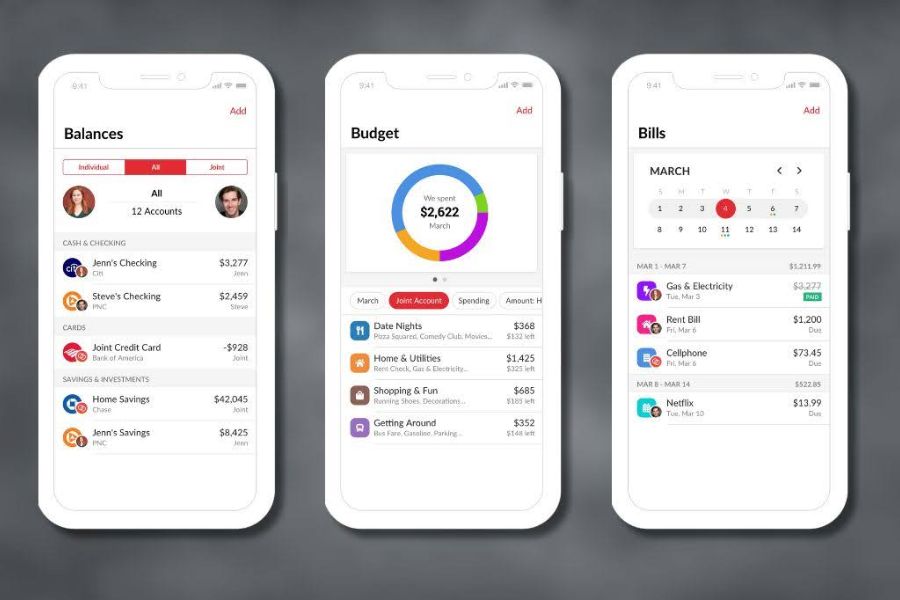
Key couples features:
- Shared expense tracking – Both partners see joint purchases
- Bill reminders – Either person can mark bills as paid
- Category limits – Set spending caps for different categories
- Chat feature – Talk about purchases right in the app
I get notified when my partner buys something from our joint account, but I don’t see their personal spending. This combo of transparency and privacy just works.
The app pings us if either of us makes a big purchase. We set our alert at $100—super helpful for keeping tabs on larger expenses.
Monthly budget setup:
- Joint categories (groceries, utilities, rent)
- Individual allowances
- Shared savings goals
- Bill assignments
Honeydue cut down our money arguments by making spending visible. Now, we talk about big purchases before they happen instead of after.
Integrating Apps Into Your Money Management System
Getting financial apps to actually help means matching them to your budgeting style and habits. The trick is finding apps that play well together and don’t add stress.
Choosing the Right App for Your Budgeting Method
Not all budgeting systems need the same app features. I learned this the hard way after trying out five apps that didn’t fit how I manage money.
Zero-based budgeting works great with YNAB or Monarch Money. These apps make you give every dollar a job before you spend it. You’ll always know where your cash is going.
If you like the envelope method, look for apps with category limits. I use apps that buzz my phone when I hit my grocery or entertainment budget. Some even create digital envelopes for each category.
50/30/20 budgeting? Go for apps like Mint. They split your income into needs, wants, and savings automatically—no math required.
Digital envelope budgeting is surprisingly easy. Many apps let you create “buckets” for each spending area, just like stuffing cash into real envelopes.
Combining Multiple Apps for Comprehensive Coverage
No single app nails everything. I juggle three apps to cover my financial bases.
One app tracks my monthly budget. Another keeps an eye on my investments. A third reminds me about bills and due dates.
Here’s my current app combo:
| Purpose | App Type | Why I Use It |
|---|---|---|
| Budget tracking | Comprehensive budgeting app | Tracks all spending categories |
| Investment monitoring | Investment-focused app | Better portfolio analysis |
| Bill management | Simple reminder app | Never miss due dates |
Budgeting systems work best when apps talk to each other. I connect my bank accounts to more than one app to skip manual entry.
Some apps sync automatically, others need a manual nudge. I always check if new apps will play nice before adding them.
Transitioning from Manual to Digital Systems
Switching from spreadsheets to apps takes a little planning. My advice? Change one thing at a time.
Start with tracking expenses in your new app. Keep your old system for budgeting. After a couple of weeks, move your budget categories into the app.
Setting up spending limits is way simpler digitally. Apps ping you the moment you overspend. That instant feedback beats waiting for a monthly spreadsheet review.
I kept my trusty spreadsheet for three months while testing new apps. Having a backup eased my nerves. Once I trusted the apps, I ditched the spreadsheet.

Import your old data if you can. Most apps let you upload CSV files from your bank. That way, you see spending trends right from the start.
Try new apps when life’s calm. Don’t overhaul your system before a big expense or during a crazy month. I made that mistake once—almost gave up on digital budgeting entirely.
Advanced Tips for Maximizing Free Financial Apps
Free finance apps pack more punch if you dig into their hidden features and tie them to your goals. The magic happens when tracking turns into real action—saving, paying off debt, and hitting those milestones.
Leveraging App Features to Build an Emergency Fund
Most people struggle with an emergency fund because they treat it like any other savings goal. I figured out that using apps to separate emergency savings from regular savings really helps.
Qapital, for example, rounds up every purchase and stashes the change in your emergency fund. It’s painless and adds up faster than you’d think.
Set up automatic transfers in your bank app. Start with $25 a week if that’s all you can spare. Bump it up by $10 each month until you’re socking away $100 weekly.
Track your progress visually with goal features in apps like Mint or Personal Capital. Watching your balance climb—even slowly—keeps you motivated.
Try the 50/30/20 rule in your budgeting app. Put 20% of your after-tax income into savings. Split that between your emergency fund and other goals based on what you need most.
Paying Off Credit Card Debt and Monitoring Credit Health
Credit card debt can wipe out your progress in no time. Free apps make setting up a debt payoff plan way less overwhelming.
Credit Karma lets you check your credit score weekly for free. It highlights what’s dragging your score down so you know where to focus.
Apps like Tally or EveryDollar use the debt avalanche method. List your debts by interest rate. Pay the minimum on all but the highest-rate card, then throw every extra dollar at that one.
Credit Karma’s score simulator is cool—you can see how paying down a card changes your score before you do it.
Set up automatic payments for more than the minimum. Even an extra $50 a month can chop years off your debt. Most banking apps make this pretty easy.
Check your credit report in the app every few months. Flag anything weird or accounts you don’t recognize.
Setting and Achieving Short- and Long-Term Financial Goals
Goal tracking works best when you break big dreams into small, monthly steps. Apps make this way less stressful once you set them up.
For short-term goals (think under a year), use apps with visual progress bars. Seeing your vacation fund hit 67% makes it easier to skip an impulse buy.
Long-term goals need a different approach. Retirement calculators in apps like Personal Capital let you plug in your age and target income. You’ll know if you’re on track, month by month.
Open separate savings accounts for each goal. A bank that lets you nickname accounts makes saving for “Europe Trip 2026” feel way more real than “Savings Account 3.”
Tie your goals to real numbers. Need $3,000 for a car down payment? That’s $250 a month for a year. Set up an automatic transfer for that amount.
Choose apps that ping you when you’re slipping behind on goals. Sometimes a gentle nudge is all it takes to stay on track.
When to Consult a Financial Advisor or Use a Robo-Advisor
Free apps handle the basics, but sometimes you need a pro or a robo-advisor.
Call in a CFP (Certified Financial Planner) for tricky tax stuff, inheritance planning, or if you’re running a business. Apps just can’t match human experience here.
Robo-advisors like Betterment or Wealthfront are awesome for hands-off investing. They rebalance your portfolio and handle tax-loss harvesting, usually for less than 0.5% a year.

If you’re managing more than $500,000, a real financial advisor can save you more than they cost. Tax strategies and estate planning get complicated fast.
Use apps to prep for meetings with your advisor. Print out reports on your spending and debts—saves everyone time.
Start with robo-advisors if your retirement accounts are under $100,000. As your finances get more complex, consider talking to a human.
Major life changes—marriage, divorce, job loss, inheritance—are times when professional advice is worth every penny. Apps just can’t cover it all.
Frequently Asked Questions
People ask a lot of the same questions about free financial apps. Here are some of the most common ones I hear about platforms, features, and finding good alternatives to Mint.
Which top free budgeting apps offer the best features for iOS devices?
From my experience, NerdWallet is a standout for iOS. It tracks your credit score in real time and offers solid financial advice for free.
Empower also shines on iOS. You get retirement planning and a fee analyzer that reveals what your investments really cost.
Khan Academy’s Personal Finance Course works smoothly on iOS and breaks down money basics in a way that actually sticks.
Investopedia’s Stock Simulator runs well on iPhones and iPads. I use it to test out investment ideas without risking a dime.
What are the standout free money management apps available for Android users in 2025?
Mint is still a favorite for Android in 2025. It covers budgeting, categorizes spending, and keeps things simple.
NerdWallet works just as well on Android. It finds places where you can save and gives you easy-to-digest financial education.
PocketSmith offers a free plan for Android. You can track two accounts and set up a dozen budget scenarios without paying a cent.
Empower’s Android app lets you check up on investments and analyze your portfolio for free.
What is the leading free personal finance software that rivals paid options?
Empower stands out as the most robust free personal finance tool. Its retirement and education planners help you map out savings for life’s big moments.
The investment checkup feature works like those fancy paid tools. I use it to tweak my portfolio and spot rebalancing opportunities.
NerdWallet’s free platform covers a lot of ground—spending analysis, credit monitoring, and tailored money-saving tips.
Mint offers premium-level budgeting for free. You get automatic transaction sorting, bill tracking, and spending alerts, all at no cost.
How does Mint rank among the best free budget apps for current financial management needs?
Mint is still at the top of the free budgeting app game. It sorts your transactions automatically and gives you clear insights across spending categories.
I love Mint’s bill tracking and payment alerts. These reminders have saved me from late fees more than once.
It syncs with most banks and credit cards, which means I spend way less time on manual entry.
Mint’s built-in credit score monitoring is a nice bonus. I keep an eye on my credit health and spending all in one place.
Can you recommend any exceptional free financial planning apps that have recently launched?
AI-powered apps like Cleo AI have really caught my eye in 2025. They analyze your spending and dish out personalized budgeting tips.
Bright uses artificial intelligence to spot ways you can save. It learns from your habits and suggests changes that actually make sense.
Even the classic apps are getting smarter. NerdWallet, for example, now offers sharper spending analysis and more tailored advice.
If you want something that feels more like chatting with a financial coach, these new AI-driven apps are definitely worth a try. The guidance feels personal and, honestly, pretty helpful.
How do the best free budgeting applications of 2025 compare to paid versions in terms of functionality?
Let’s talk about free apps—think Mint or NerdWallet. They really do cover most of the basics you’d expect. You can categorize transactions, set up spending alerts, and handle simple financial planning right out of the box.
But when you start poking around for more advanced features, you’ll notice the differences. Paid options like Monarch Money let you connect as many accounts as you want and track your net worth in more detail.
I’ve noticed free apps usually show ads or nudge you toward extra services. If you go with a paid app, you get an ad-free dashboard and, honestly, better customer support.
From my own experience, free tools are great for straightforward budgeting. If your finances get complicated or you want to dive deep into investment tracking, that’s when I’d consider paying for those extra features.
